Showing posts with label Security. Show all posts

Monday, February 18, 2019

Microsoft Dynamics 365 Upgrading from 8.2.2 to 8.2.3

As part of troubleshooting Server Side Sync we upgraded our on-premise Dynamics 365 environment from version 8.2.2 to 8.2.3 (8.2.3 Details). There were several issues that occurred from this upgrade that I wanted to share to prevent you from falling into the same traps (or at least knowing how to recover when they arise).

Related Articles: Server Side Sync troubleshooting steps, Upgrade from 8.1.8.22 Issues

X-Anchor Header Change
The main reason we upgraded to this version was to ensure all integrations with Exchange used the X-Anchor Header. After the upgrade, this feature needs to be enabled by updating the OrgDB setting UseXAnchorMailboxInExchangeRequestHeader to True.

Navigation
After the upgrade, one of our Navigation menus had additional options. To resolve, I simply edited the navigation as part of the form editor and included this in a solution. Then imported this solution as part of the Live upgrade.

SQL Error
Post-upgrade several users reported getting a SQL Error when attempting to access Dynamics 365. This error would pop up anytime a list of records attempted to load without a wait/timeout. Direct links to Accounts could open but related records could not be viewed.

Teams are heavily used in our environment for access and sharing. We found that each of these users was a member of over 20 teams. When several teams were removed, access returned as normal.

Reopened Tasks
CRM for Outlook is also used in my organization. We have seen cases in the past where tasks or calls were created in Dynamics 365 from Outlook even though they already existed (lots of duplicates!). This issue is no longer occurring, but some tasks and calls are being reopened.

So post upgrade, its important to monitor modified Activities especially where they were created in the past and already have an Actual End populated.

Sharing Advanced Find
The last issue we have experienced (or at least we have found so far!) was related to sharing Advanced Finds. Users were able to share views with individual users but received an error when attempting to share with a team. Downloading the log file revealed "missing prvReadUserApplicationMetadata privilege". The User Application Metadata option is available on the Security Role Customization tab. I granted User level Read Access and this resolved the issue.

Has anyone else upgraded to 8.2.3? Any other issues I should be aware of?

User Application Metadata Security Update


Monday, December 3, 2018

Managing Users in Dynamics 365

In a recent CRMUGDC meeting Jim Novak talked about creating a new XrmToolBox tool to see users with a specific security role. This will be a helpful tool when it is ready for public use. In the mean time, you can also use Advanced Find for this.

Here are some tools I use to manage my user access inside of Dynamics 365.

Advanced Find for Users with a Specific Role

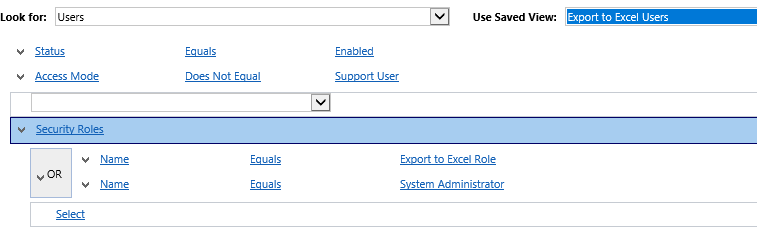
You can build an Advanced Find like the one below to see users with a specific Security Role. Keep in mind you cannot look for a Security Role lookup as there is a new copy of the role for each business unit. Instead you can search that the name equals the name of the role name.


In my organization, we use this method to check users with System Administrator and Customizer so we can quickly check users who have elevated access. This can be used if you have a dedicated role for other permissions such as Export to Excel. Just keep in mind that System Administrator will always have that access as well.


Advanced Find for Team Membership

I also use Advanced Find to check users in a specific team. This can be a bit faster to check than opening the team. Additionally, this allows me to view from the User list if I need to perform actions on the whole team (ex. add Security Roles).


This can be especially helpful if you also use Field Level Security. If you have FLS turned on for a specific sensitive field and have a team added to that profile, you may want to review those users quickly.


Dashboards

The next step can be to put these views together in a dashboard. Then in a few clicks you can quickly see all this data in one place. This also could allow you to grant non-administrator users access to see this data and provide feedback. Don't forget to share the dashboard and all the views if you are using a personal dashboard.


Report: User Summary

This report is a good tool provided out of the box. It will show you all Security Roles for users by Business Unit. This can be done for all users or for just a selected group (maybe from your Advanced Finds above!). I use this to save current state information in case it is needed later.


XrmToolBox Tools for User Management

While Jim is still finishing off his tool, there are some other tools already available that you can take a look at to see if they meet your needs.


  • Access Checker - Select the entity in question, a specific record, and the user then the tool will show you what rights that user had specifically
  • User Roles Manager - add or remove roles in bulk. This can be done for all users or based on a view. I have used this to create a view of all users with an existing role and then use the tool to replace this with a new role.
  • User Settings Utility - take a look at this tool if you need to change other non-Security Role setting such as number of records per page, Emails sent on behalf of, etc.
Those are some tools I use for managing our user access. What other methods do you use?

Friday, November 10, 2017

CRMUG Summit 2017 Recap

It’s hard to believe that CRMUG Summit Nashville was already a month ago! The 2017 event was amazing! Full of live music, great content, and lots of networking! Of course, the #CRMUGDC Monkey was hanging around and we even had a party for all the DC, Virginia, and Maryland Attendees. If you didn’t make it out to this party, be sure to check out the Photo Gallery.

Better late than never, check out the top takeaways from the sessions I attended at #CRMUGSummit2017 (I also linked to the materials for those who attended Summit to download).


Alex Fagundes

Data breaches are very common and very expensive plus on average the breach isn’t detected until after over 6 months. We discussed statistics, ways to prevent and detection techniques. In addition several tools were discussed for different security functions.

Top ways to prevent:

·       Move to CRM Online – 99.9% more secure

·       If On Premise: Set up external and internal scans weekly to check for issues and follow best practices (network and windows server hardening best practices)

·       Have a security awareness program to train your users – they are the weakest point! Plus minimize their security to eliminate risky access they don’t need (Export to excel, SDK access, etc.)

·       Follow Service Account best practices – one server account per integration, do not grant admin rights, set as a non-interactive user (cannot login via the web)

·       Turn on Two Factor authentication


Rick McCutcheon leading a panel featuring: Peter Vieira, Anne Stanton, Beth Burrell, Jennifer Codding, and Neven Bradasevic and Melita Bouchet.

The panel broke the discussion into the different phases of the project and discussed their tips and tricks for user adoption including:

·       Set expectations for the initial release

·       Gather information from your users and identify your key stakeholders and champions

·       Involve end users in the building process

·       Discuss end results with stakeholders especially reporting needs – Remember that data has value and explain this to users

·       Don’t forget about less frequent tasks users need to perform (What tasks do you perform weekly? Monthly?)

·       Find the low effort, high reward items to resolve pain points (the gold nugget)

·       Involve department influencers in testing

·       Plan trainings carefully

o   Set up groups based on level of skill with the system, knowledge of past systems, keep departments together

o   Find Training Champions to become subject matter experts and help other users

o   Consider pairing stronger and weaker users together to assist each other

o   Keep training materials specific and provide in multiple formats (manual, video, email, etc.)

o   Use real data to keep training relevant


Alex Fagundes

So many tips on performance and many beyond my level of expertise. Here are just my top takeaways that I can put into practice:

·       Use a modern browser with temporary files (cache) set to >=250 MB

·       Views – sort by only one column, minimize or eliminate columns from related entities

·       Remove “All Accounts” Default views on large entities, no reason to display everything

·       Forms – Collapse unnecessary sections, avoid using too much JavaScript and instead use multiple forms

·       Workflows – keep Asynchronous, auto delete when complete and only have ONE running per entity (then use child workflows for different actions)

·       Follow SQL Best practices and use tools to review your indexes

·       Avoid Plugin chains – one plugin triggering two more

·       Run enterprise reporting against a read only replica of your system

·       Set up automated monitoring that can notify you if there is an issue


Panel featured Jennifer Johnson, Trisha Tunilla, Rob Harrison and Victor Guven

This is a topic that I especially needed assistance on – how to help Marketing and IT get along and get the results both sides want. The major take away from this session was just to get shared understanding on both sides. Have IT spend time with marketing to understand how they manage their business. Have Marketing learn more about the systems so they can better understand the framework. Build relationships on both sides to ease the process of working together.

This understanding and personal connection will build the trust necessary to get work done. When work comes from the other side, the team knows it is necessary. Most of the problems between marketing and IT can come down to poor communication. Take the time to build that understanding.

We also spent some time discussing the value of data and what to do with “dirty” data. These discussions can be hard when IT may not want “bad” marketing data in the CRM system. This comes down to determining a data governance plan at the beginning. This allows us to choose what data is the master and what data can go where. Remember that marketing sees all data as an opportunity!


Ryan Talsma

This was an excellent session that helped to clear up the confusion between the Outlook App and the soon to be deprecated Outlook client (expected to be gone by the 10.0 major release, end of 2018?).

Most importantly – the App is available for On-Premise. The main difference is that the Client must be installed on all workstations where as the App is a light-weight add-in pushed via Office 365. The App does require Office 365 and Server Side Sync. Server Side Sync means that the user does not need to be logged in for a workflow to send email and appointments can sync when out of the office as well. The App is also much more stable than the client so fewer (if any) issues with disconnecting, re-enabling, etc.

Last important note – the App can be pushed out to users if webmail (OWA) while they still use the full Outlook client on their office machines.


Panel discussion featuring Nhung Le, Bill Meadors, Beth Burell, and Phyllis Eriksen.

In this session, common issues were broken down into a few categories and then tips were discussed for how to handle each type.

·       Permission Problems

o   Do not edit the Out of the Box Roles – then you can review these if issues arise

o   XRMToolbox: Access Checker – select the user and entity to see the final permissions they have with all roles combind

o   If intermittent – try clearing the cache and restarting

o   Remember with Field Level Security – no access is granted by default

o   If it could be a permissions issue, assign Admin role temporarily to see if it resolves the issue. If it does, then the issue is permission related.

·       Data Import/Export Errors

o   Review the data mapping

o   If error on export, verify there are no duplicate field names as this will cause an error

o   To update data, an export must be done (must export for re-import, you cannot import and match)

·       Error Messages with no Information

o   Check Application log for details

o   Use Auditing to isolate issue (do not turn on for everything)

o   F12 for client-side troubleshooting

o   On-Premise: monitor event log for errors. These could be a sign of something bigger.

·       Testing tips

o   Clear cache and try to reproduce

o   Turn on F12 then try to reproduce

o   Test on a different browser, different computer, etc.

o   Check browser plugins


Gus Gonzalez

This session covered some great tips to keep in mind for all changes being made in your system. The goal of many of these is to change our thinking to implement with a business mindset as we want to enhance business outcomes not just think about the technology. These rules exist to help us avoid potential problems.

1.       Keep it simple – always look for the simplest, easiest, least work solution.

2.       Check before Create – if you can use something that already exists, use it. Avoid adding additional entities, fields, views, etc.

3.       Allow users to deactivate – remove delete permissions. Tell them “Deactivate” is the CRM word for delete, same behavior from a user perspective.

4.       Don’t customize production – plan then deploy to development, move to test and test, then deploy to production. Use unmanaged solutions.

5.       Use Tools – When getting a requirement, see if there is a tool you can use before building yourself.

6.       Change management systems – follow a change management system to help you implement successful change

7.       Field best practices

a.       Never use “Whole Number” because they may want more precision later

b.       Stay away from “Two Options”, use Option Set instead (no default, allows for change)

c.       Always use Global Option Sets

d.       Turn off “Searchable” for unused fields

e.       Use “Field Security” only if really needed

f.        Deactivate “Auditing” if info is not important

g.       Create “Mappings” if added to multiple related records

8.       Decentralized Command – get help and share administration tasks with others

9.       Be Proactive – stay up to date with Microsoft releases and new features, get involved in the preview program to test things before they are released

10.   Reach out! – Reach out to the experts for help! Don’t try to do everything on your own.

Thursday, March 16, 2017

Releasing Field Level Security Profiles

Field Level Security (FLS) is a great feature which allows you to lock down certain fields to specific users or teams. You can control who can read the data, create the data and edit the data. This allows administrators to account for many security needs. For more detailed information on Field Level Security review this TechNet documentation.

It is also a good idea to use solutions when moving customizations and this includes customizations to your security model and security settings. These are areas that can greatly impact users so they always should be tested in a development environment if possible.

Here are some things to keep in mind when moving Field Level Security Profiles between environments:
  1. The field must have FLS enabled before the FLS Profile can be updated. This means your release process must be a 2 step process: (1) Import a solution containing the field and publish, then (2) Import a solution containing the FLS profile and publish. If all is contained in one solution you will get a warning on the FLS profile but not an error. Then all permissions for the field (with FLS freshly enabled) will be set to No. This means that only Administrators can view and edit the field.
  2. When creating a new FLS profile, members must be added in each environment. The linked teams and users are not included in the solution and must be added manually.
  3. Test thoroughly in each environment. Remember Administrators will always have access to any field with FLS enabled so other users need to be involved in testing. If one users is doing the testing for multiple roles, double check your changes and have them clear their cache between test cases. This will ensure any issues from items 1 and 2 do not occur.
How have you used Field Level Security? Any other tips for Administrators to keep in mind?

Saturday, October 1, 2016

August 2016 Blog Review


Let's start the month of August off right with some CRM Tip of the Day:


Ledgeview Partners posted Setting Up a Sales Follow-up Workflow in Dynamics CRM. This walks through a workflow example showing the planning and final logic.


Ledgeview also shared Customize Color of Dynamics CRM Icon Backgrounds. Use these steps to theme your entity icons to match the rest of your system.


If you are interested in testing out a portal solution check out Donna Edward's CRM Online Portal Trial - Step by Step Installation.


Sonoma Partners was busy this month and shared:


Hitachi Solutions posted How to Create a Voice of the Customer Survey in Dynamics CRM. Walk through these steps to create surveys that you can send to your customers directly from CRM.


Mitch Milam shared Dynamics CRM Security: Crossing Your I's and Dotting Your T's. This is a great example of the need to double check everything and never make assumptions in your system.


Speaking of security, you can also check out Leon Tribe's post on Securing Records by a Field Value in CRM. This gives an overview of how to handle a complex security situation.


PowerObjects also shared several posts this month for you to check out:


That’s all for August!

June 2016 Blog Review


Clearly summer schedules got the best of me this year. So let's quickly get caught up on all the CRM news.


I always recommend you stay up to date with CRM Tip of the Day, here are a few to start with:


Sonoma Partners shared Get ready, Dynamics is about to get "Linked" in. This talks about the Microsoft acquisition of LinkedIn and what it could mean for the future.


PowerObjects shared tips for dealing with workflow email errors in Workflow Generated Email stuck in "Pending Send" - Get it sent!


EMEA Dynamics CRM Support posted a great overview of Workflows in Dynamics CRM. This talks about the different kinds of processes and what you need to get started.


Workflows were very popular this month and Ledgeview Partners also shared Using Dynamics CRM Workflows to Create Tasks Automatically. Follow along in their example to better understand automating activities via CRM.


One of the cool new features in CRM 2016 is Excel Templates! To learn more reach Hitachi Solutions' 5 Tips for using Excel Templates in Dynamics CRM.


That's all for June!

Friday, May 20, 2016

May 20 Blog Review

Let's jump into a quick blog review for your Friday afternoon.

PowerObjects posted Solving Security Headaches: Display Rules Based on Security Roles. This walks through how to use the Ribbon Workbench to modify the security of your forms.

CRM Tip of the Day shared the Illustrated guide to entity creation in Dynamics CRM. This walks through what to do when creating a new entity and some questions to keep in mind. Most important tips from my point of view are PLAN (all potential users, future impact) and don't turn on anything you don't need right now (most can be turned on later if needed).

Mitch Milam expanded on this TechNet Article with What's New for Administrators and Customizers in CRM 2016 and CRM Online. Check this out to be prepared for the updates.

That's all for today. Have a great weekend!

Monday, April 4, 2016

April 1 Blog Review

Let's jump right in to the CRM news from the past week.

PowerObjects shared Filtered Lookups vs. Dependent Option Sets. This shows you how to create similar functionality to a code-driven dependent option set using lookups.

CRM in the Field posted about What does a Dynamics CRM Administrator Do? The role of an Administrator can vary greatly from setting up users to writing JavaScript to configuring servers. This article lists some of the key functions that you need someone in your organization to handle.

CRM Tip of the Day wrote about Missing Entitlement Permissions. This describes how to solve the mystery of getting errors on Entitlement access when Entitlements are not even in use.

Sonoma Partners posted on CRM 2016 Excel Templates. This explains what Excel templates are and how you can set them up.

That's all for this week. Have a great day! 

Friday, March 18, 2016

March 18 Blog Review

Welcome to this week's blog review. We are going to jump right in to avoid rambling about the pitiful mess my March Maddness bracket has become.

Microsoft announced a new Voice of the Customer Survey feature. Check out this article for more information about the information available and answers to your most common questions.

PowerObjects posted about How to Use Dependent Lookups for Dynamics CRM 2013/2015/2016 Like a Pro. This walks through how to use two related entities and business rules to create dependent lists without code.

CRM Tip of the day shared the Illustrated Tipster Guide to CRM Forms. They feature a great chart that describes the use of each type of form and the features it supports.

Salentica blogged about CRM Full-Text Search and the Mysterious Case of Mr. Way. This describes an interesting issue where certain records were not pulling up when full text searching was in use.

Sonoma Partners asked How well do you Delegate? They provide a solution for when one user want's to delegate visibility of certain records to another user.

That's all for today folks. Have a great weekend!

Friday, March 11, 2016

4x4 Series: Security Suggestions for the New Administrator

I was asked to participate in the CRMUG 4x4 webinar series. These are quick webinars with multiple speakers sharing tips and answering questions. I also wanted to document my tips here for future reference.

There are so many tasks for a new CRM administrator. Security is a key area to focus on. The administrator needs to be familiar with who has access to what and why. So this is an area every administrator should invest time in right away. If you are inheriting a system, reviewing the security at the beginning is a great way to provide immediate value because you may see security issues or concerns that were not previously addressed.

Dangerous Permissions
There are several permissions to watch out for in your security roles:
  • Delete - is there ever a reason your users need to delete? If not, remove it (I would vote that it is removed for all entities and most users)
  • Bulk Edit - Do you want users to be able to edit multiple records at once? If done incorrectly, this could result in a large number of records having valid data removed and replaced with something else.
  • Export to Excel - Depending on the sensitivity of your data you may want to remove the ability to Export to Excel. Keep in mind that the permission is for the whole system not per entity. So if they can export their list of activities they could also export contacts with their SSN's.
  • Import - You should determine which users need to create batches of records. If this is combined with Export to Excel this can be very powerful as you can export the data, edit it and import it back into CRM. However, if this is done incorrectly it could again result in the loss of valid data.

Some other permissions to check on include: Bulk Delete, Merge, Run Workflow, etc.

Also keep in mind that Deactivate is not a permission. This can be a good alternative to delete but you should also ensure that users are trained on the proper use that fits within your business process.

Security Role Report
CRM has a Security Role report out of the box. This can be run on all users to see what roles they currently have. By default this role will include all users (enabled and disabled). However, you can run the report on users in a specific view or selected users. This allows you to narrow down your search (at least to enabled users) before reviewing.

This report is not the easiest to read but you can export it to excel and modify, search, move, etc. to make it a bit easier to work with.

Advanced Find
My favorite way to monitor security is using Advanced Find. You can build Advanced Find views to show all users on a specific team or with a specific security role. I find this particularly valuable for monitoring the high access roles such as System Administrator and System Customizer. This allows you to quickly see everyone with that type of access.

Note: When you create a view for all users with a Security Role, you will want to search for where "Name" equals the role name. This allows you to capture all the different versions of the role (since there is a copy per business unit).

Advanced Find of Users on a particular team

Advanced Find of Users with a particular Security Role


Other tips?
There are so many other great security tips. Adam Vero shares a wealth of knowledge on this topic - breaking out security role by functionality (Base role + Export to Excel role for example), understanding cascading relationships, understanding sharing (See Special Privileges in CRM Security Roles, Figuring out Shares in the PrincipalObjectAccess POA table in CRM, Security Roles and Teams in CRM - An Inconvenient Half-Truth). There are even tools that can tell you all the permissions in a given role and vice versa (Check out Security Role BrowserXRMToolBox).

Tips from Other Panelists
Thanks to Jim Lauer and Jay Murphy for all of these great tips!

  • Start with a Basic role for all users then add additional access
  • Limit Sharing to maintain good performance
  • Keep it simple, make it easy to administer
  • Copy system roles, do not edit in case you need to review later
  • Add a number or other prefix to your custom roles to keep them at the top of your list
  • Justify why access is needed before making changes. "Just because you can, doesn't mean you should"
  • Use a temporary team and add a role to test access for a limited time
So what are your tips? What Security issues have you had to deal with? Any surprises?

Friday, December 18, 2015

December 18 Blog Review

This will be the last blog review before my holiday time so let’s make sure it is interesting.

I must start by reminding you that the CRMUGDC 2016 Chapter Launch Party was just announced! This will be a fun networking event on Thursday January 21st. It will feature eating, drinking and question-answering. Come out to learn more about all the user groups in DC, Maryland, and Virginia and talk with CRM users in your area. For more details, read the Blog or get Registered.

Within the last few weeks Microsoft announced the release of CRM 2016. This week they announced the acquisition of Metanautix, a data analytics company. No information is given about CRM integration but it will be interesting to see how this develops in the increasingly connected Microsoft product catalog. (Although Salesforce is mentioned in the announcement. Odd.)

With 2016 in mind, check out CRM Tip of the Day’s post on CRM 2016 Postponed Features. This talks about some items that were originally expected in CRM 2016 that have been pushed out to upcoming releases.

PowerObjects was very aware that most of the population was distracted with Star Wars this week and so their blogs reflect that. Be sure to read The Force is Strong with this Version: Top New Features in Microsoft Dynamics CRM 2016 Online and Light Side or Dark Side? Personalize Dynamics CRM 2015 with Themes.

Adam Vero posted Figuring Out Shares in the PrincipleObjectAccess POA table in CRM. Take a close look at this if you are experiencing any odd access issue and need to dig in to all the sharing going on in your organization.


That’s all for today folks. Happy Holidays!

Friday, November 20, 2015

November 20 Blog Review

Let’s jump right in to the CRM news of the past few weeks!

Update 0.2 for CRM 2015 On-Premise has been released. For all the information review CRM in the Field’s Overview Blog.

PowerObjects shared Manipulating the Value of Days Remaining between Today and the Expiration Date in Calculated Fields. This shows you how to modify the Days Remaining field so that it will not show a “-ve” value when the expiration date is in the past.

Adam Vero the CRMGuru posted an interesting post on Figuring Out Shares in the PrincipalObjectAccess POA Table in CRM. This provides more information about how shares are saved behind the scenes and how to view/interpret that data.

Chris Cognetta shared the Great Microsoft Cloud InfoGraphic! This shows the number of users that are on the different Microsoft cloud offerings. It shows why this is such a large area of emphasis and why this continues to be important for future growth.

Leon Tribe blogged about the Post MVP Summit Roundup. Unfortunately not too much information can be released yet but at least we can see everyone’s smiling faces and get a little glimpse into what it is like to be a CRM MVP. Also mentioned was that the CRM 2016 features that have already been announced were presented and provided a much better understanding of the capabilities. So be excited for more information at the end of the year!

Finally, one quick tip from CRM tip of the day is what to do with Disabled User’s Personal Views. Everyone runs into a situation where a user leaves and their views remain assigned to that now disabled user. Check out this post to see 3 possible solutions.


That’s all for today folks. Have a great day and Happy almost Thanksgiving! (In America, or happy almost Christmas, Thanksgiving was forever ago why are you still talking about it in Canada :) )

Wednesday, October 21, 2015

Summit 2015: Day 2 Takeaways

It's a bit late but it's always good to learn more Summit takeaways. Here is what was discussed on Day 2 of Summit 2015.

Upgrading
Between 2011 and 2015 there are over 1500 updates so there are many reasons to upgrade. Keep in mind that the longer you wait to upgrade the more difficult it will be. To upgrade (not migrate/re-implement) you will need to go through each version. Keep in mind the optional table merge for 2013 needs to be done to move to 2015. Make sure you schedule time for this in your upgrade if you want to skip 2013.

Upgrades are difficult because of the little hacks and things we did to get around limitations. Using Business rules will make future upgrades easier. Make sure you take advantage of the new features to replace the code you have.

Keep in mind that some new permissions were added with 2013. This means if you have custom Security Roles these will need to be updated to include the new permissions.

If you are considering using mobile, set up IFD and ADFS now. Code will need to be updated to work correctly with IFD. Take the time to do that work with the upgrade so that when you are ready you can just turn on IFD.

Make sure you talk to your ISVs early and ensure they have a migration and upgrade plan. Be sure to follow this plan to prevent accidental deletion of data.

When reviewing your reports, look on the SSRS server to see the date for the last time it was run. If it hasn't been run for 6 months, remove it.

When demoing new functionality, use CRM Online. CRM 2015 online is the same code base for CRM 2016 on-premise.

Tools:
  • Legacy Upgrade Tool - report of everything that I going to fail in IE or Other browsers with the upgrade
  • XRM Tool box: Document generator  shows all of the items that have been added to entities


Security
CRM was designed for sharing data. Don't over complicate it with too many business units or security limitations.

New in 2015 - Hierarchical security. This allows you to configure security based on manager or position hierarchy. In both, users will have full access one level down, then read access down the rest of the chain.

A great way to prevent mistakes that are more difficult to control is real time workflows. You can have these run pre-delete for instance to stop users from deleting records of certain statuses. These can be used for many user-error items such as changing status, reassigning, deactivating, etc. Bonus tip: You can even put the user's name in the error!

Implementation
When looking at a new to you implementation, first take time to evaluate security. This helps you be effective on day 1 as you evaluate concerns, risks, etc.

When building, create an implementation strategy. This gives you something to follow and later will provide historical data of what was done, when, and why.

When working on changes, ensure there is a gate keeper for these requests. This person can manage any dependencies and act as the owner for all changes that go into the production implementation. It is good if this person has a technology background so they can understand and monitor all dependencies for multiple areas (within CRM, integrations, plugins, etc.).

Share the love of CRM with your developers. Show then CRM and explain the power (i.e. creating a field here is updating the database schema). Show them how to build fields, workflows, business process flows, etc. This is a great way to get them involved and help to make sure all changes are fully evaluated to see if they can be done inside of CRM or not.

User Adoption tips:
  • Find your biggest resistor and determine the main reason for the resistance
  • Work with the resistors through personal training. Show them how CRM will help them. They will become your cheerleaders without even realizing it.
  • Continuously provide tips and tricks
  • Drive excitement by showing them new features and how these will solve their problems
  • Show users what's in it for them


That's all for today. I hope to have Day 3 posted soon!