Friday, August 21, 2015

August 21 Blog Review

Lots of tips, tricks and news to share with you this week!

First check out the DynamicsCafe post – Start-up Trupanion and Microsoft Dynamics CRM Help Ease the Minds and Hearts of Pet-Owners. I clicked on this mainly because of the picture of the puppy but I was pleasantly surprised. The video describes how this pet insurance company uses CRM to better serve their customers. They use CRM to route the call to the most appropriate agent based on if they own the same kind of dog or live in the same city. They also use Unified Service Desk to make sure everything they need is right at their fingertips.

PowerObjects did not post and puppy pictures but did share Utilizing Alternate Keys in Dynamics CRM Integrations. Creating an Alternate Key can allow you to interact with records through the API without having the GUID of the record. Keep in mind that adding an Alternate Key will create a new database index on that field.

Be sure to check out How to Ensure a Successful CRM Implementation and Adoption also from PowerObjects. This goes over the important things you need for your CRM rollout to go well including formalizing your business processes before setting up CRM and getting management support and buy-in.

Ms. Dynamics CRM shared Social Engagement (formerly known as Social Listening) Trial. This shows screenshots from the Social Engagement tool and gives instructions on how to try it out yourself!

Finally, let’s check out the tips shared on CRM Tip of the Day:


That’s all for today. Have a great weekend everyone!

Friday, August 14, 2015

August 14 Blog Review

It seems like a quiet week in the CRM world but we did have the CRMUG Washington, DC chapter meeting! If you are a CRMUG member, make sure you check out the Blog Recap from our presentations on Customer Service.

PowerObjects posted about Adding JavaScript to Quick Create forms in CRM 2015. This talks about how to access the Quick Create form and what you need to know to add JavaScript to it.

The Dynamics EMEA CRM Support blog shared CRM Online Themes won’t work if Enahable High Contrast Option is Checked. This is a quick tip if you are having trouble using the Themes feature available in CRM 2015.

Let’s also take a quick look at some posts from CRM Tip of the Day:


That’s all for today. Have a great weekend!

Wednesday, August 5, 2015

August 5 Blog Review

Due to busy summer schedules we have a quick, early blog review this week.

Most importantly, make sure you register for next week’s Washington, DC CRMUG Chapter meeting. We will be discussing Customer Service with presentations from a customer using Parature and AdxStudio.

Microsoft made an interesting announcement this week – Microsoft Acquired FantasySalesTeam, an innovative sales gamification platform, to help Organizations increase productivity. This shows that Microsoft is embracing the gamification aspect of corporate work. It will be interesting to see how this will be integrated or involved with CRM.

PowerObjects posted the New Navigation Guide for CRM 2015. This compares the old and new interfaces and highlights some great improvements.


That’s all for today. Have a great day!

Friday, July 31, 2015

July 31 Blog Review

Let’s finish off July with a great blog review! Check out the CRM news from the last few weeks.

PowerObjects posted a how-to article about Changing the Color of Custom and Out-of-the-box Entities in CRM 2015. This explains how to change the background color of the tiles in CRM 2015 Update 1.

PowerObjects also posted Exporting Data to Re-import: The invalid Column Headings issue. This discusses how having fields with the same display name can cause an issue when trying to re-import.

If you are interested in Parature check out Leon Tribe’s post on The Current State of Parature – Dynamics CRM Integration. You should also register to attend the August 12 CRMUGDC Meeting which will be focused on Customer Service!

We also have a few quick tips from CRM Tip of the day.

First Prevent Duplicate Outlook Contacts by using Server Side Sync. This prevents issues from installing or re-configuring CRM for Outlook.

Also check out the Tipsters guide to Dynamics CRM for Phones. This is a video showing the updated CRM for Phones app that came with the CRM 2015 update 1.


That’s all for today folks. Have a great weekend!

Tuesday, July 21, 2015

#CRMUGDC Summer Meet Up Recap

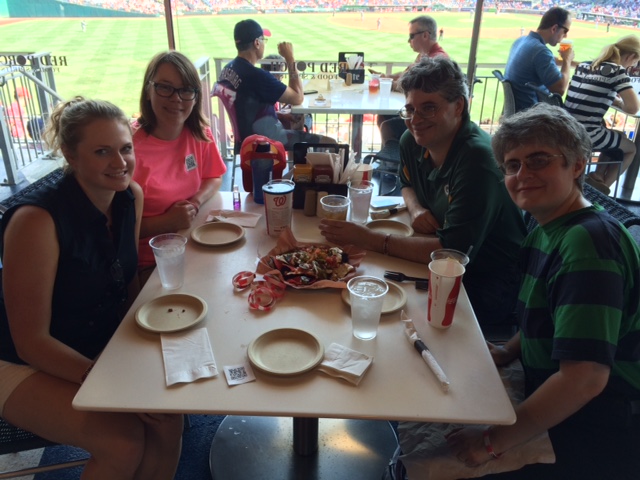
On Saturday July 18 the CRMUG chapters for DC, Maryland and Virginia came together to attend a Washington Nationals game! The previous night's game had been suspended so we actually got to see 1.5 games for the price of 1.
It was a good time to see chapter members in a more relaxed setting and enjoy some yummy food together! We even made sure to talk about CRM! (Specifically upgrading implications and concerns.)
Hopefully we will get to have many more events like this in the future. Check out the pictures below and make sure to join your local chapter community to learn about the next one (DC, Baltimore, Richmond). If you are not yet a member of CRMUG, I have compiled some useful information to get started!
P.S. I have lots more #CRMUGDC wristbands so come to our next meeting on August 12th to get one!


Friday, July 17, 2015

July 17 Blog Review

Welcome to this week’s blog review! The most important takeaway today is that all of you should join me at the Nationals Game tomorrow (July 18). This is a meet up for the Washington, DC area CRMUG chapters. It will be a great way to meet other CRM users and learn a bit more about CRMUG even if you haven’t come out to our quarterly meetings.

Back to other CRM news, check out PowerObject’s Dynamics CRM 2015 Spring Update 1: Date and Time Data Type. This is talking about the new data types of User Local and Time Zone Independent. This gives customizers a way to ensure that all users see the same date when they look at a date only field.

PowerObjects also posted on How to Define Scope for a Dynamics CRM Project. This talks about the steps you should take when you plan out the project and what pieces need to be identified.

The Microsoft Dynamics Team Blog announced a way to Track Incoming Email from Anywhere with the new CRM App for Outlook. This allows you to use the CRM for Outlook features from the Outlook web app or desktop app.

CRM Tip of the Day also talked about CRM for Outlook and posted Read Only Users and CRM for Outlook. This discusses how the CRM for Outlook configuration requires a user to have write access to CRM.


That’s all I have for today folks! Have a great weekend!

Friday, July 10, 2015

July 10 Blog Review

It is a beautiful day! Really makes you want to go to a baseball game!

Let’s quickly jump in to the news of the day!

CRM Tip of the day posed a video: Tipsters Guide to Folder Level Tracking for End Users. This shows users how to set up folder level tracking when you are using Server Side Synchronization.

Hitachi Solutions shared a quick tip – Hey! Where are the Users in CRM 2015!? In CRM 2015, instead of having users directly under Administration you need to look under Security.

The CRM Support Blog posted Dynamics CRM Support with Windows 10, Edge browser, and Office 2016. As some have speculated only CRM 2013 and CRM 2015 will be supported with Windows 10.

Finally, Jukka Niiranen discusses the State of Dynamics in 2015. This is a look at many topics around the state of Microsoft and CRM.


That’s all I have folks. Have a great weekend!