Showing posts with label CRMUGDC. Show all posts

Saturday, April 13, 2019

May 2019 Events

There are several great events happening in the next few weeks where you can meet #CRMUGDC the Monkey. Make sure you save the date and get registered!

CRMUGDC Q2 Chapter Meeting

  • May 15, 8:30am-12:30pm
  • Location: Microsoft Chevy Chase
  • Speakers
    • Geoff Ables: Designing Customer Engagement Processes
    • Nelson Johnson: Power BI for Beginners
    • Kalpana Sivanandan: Microsoft Teams Introduction
  • Get all the details and register here!
  • Check out more events and discussion in the Washington, DC Chapter
If you can't make it to the May 15 DC event, keep in mind that the Reston, VA and Richmond, VA Chapters always meet the same week. We work together to coordinate speakers and plan great content. These are other great chapters to attend!
For those who will be in Philly early, you can also check out the local D365UG/CRMUG Chapter. Their Q2 meeting will be taking place on Friday before D365 Saturday. Check out the details for the May 17 meeting and get registered!

Monday, December 3, 2018

Managing Users in Dynamics 365

In a recent CRMUGDC meeting Jim Novak talked about creating a new XrmToolBox tool to see users with a specific security role. This will be a helpful tool when it is ready for public use. In the mean time, you can also use Advanced Find for this.

Here are some tools I use to manage my user access inside of Dynamics 365.

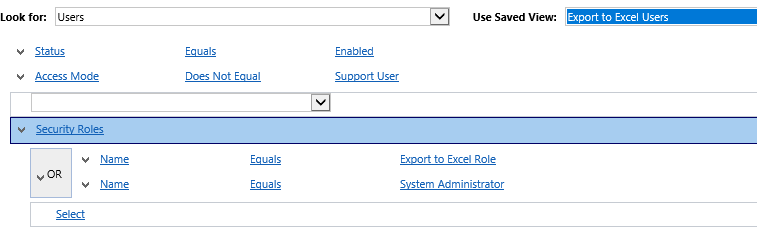
Advanced Find for Users with a Specific Role

You can build an Advanced Find like the one below to see users with a specific Security Role. Keep in mind you cannot look for a Security Role lookup as there is a new copy of the role for each business unit. Instead you can search that the name equals the name of the role name.


In my organization, we use this method to check users with System Administrator and Customizer so we can quickly check users who have elevated access. This can be used if you have a dedicated role for other permissions such as Export to Excel. Just keep in mind that System Administrator will always have that access as well.


Advanced Find for Team Membership

I also use Advanced Find to check users in a specific team. This can be a bit faster to check than opening the team. Additionally, this allows me to view from the User list if I need to perform actions on the whole team (ex. add Security Roles).


This can be especially helpful if you also use Field Level Security. If you have FLS turned on for a specific sensitive field and have a team added to that profile, you may want to review those users quickly.


Dashboards

The next step can be to put these views together in a dashboard. Then in a few clicks you can quickly see all this data in one place. This also could allow you to grant non-administrator users access to see this data and provide feedback. Don't forget to share the dashboard and all the views if you are using a personal dashboard.


Report: User Summary

This report is a good tool provided out of the box. It will show you all Security Roles for users by Business Unit. This can be done for all users or for just a selected group (maybe from your Advanced Finds above!). I use this to save current state information in case it is needed later.


XrmToolBox Tools for User Management

While Jim is still finishing off his tool, there are some other tools already available that you can take a look at to see if they meet your needs.


  • Access Checker - Select the entity in question, a specific record, and the user then the tool will show you what rights that user had specifically
  • User Roles Manager - add or remove roles in bulk. This can be done for all users or based on a view. I have used this to create a view of all users with an existing role and then use the tool to replace this with a new role.
  • User Settings Utility - take a look at this tool if you need to change other non-Security Role setting such as number of records per page, Emails sent on behalf of, etc.
Those are some tools I use for managing our user access. What other methods do you use?

Monday, November 12, 2018

CMRUG Summit 2018 Takeaways

Next week, CRMUGDC is meeting for the last meeting of 2018. Part of our agenda includes sharing our top tips and takeaways from CRMUG Summit in Phoenix. This means it's about time for me to review my notes. My Summit experience is below and if you want to hear from others, then get registered for the Washington, DC CRMUG Meeting on November 14th!

Summit Phoenix was a great event! I spoke in 4 sessions and threw an awesome chapter party in partnership with Cobalt!

CRMUGDC 2018 Chapter Party in Phoenix
Now, let me share the top takeaways from these sessions I attended. There were lots of great sessions but there is limited time in the day! Be on a lookout for these sessions and more as future webinars on CRMUG.

5 Ways to use Flow to Improve Dynamics 365
Aiden Kaskela, Mallory Lawhorne


  • Demo session featuring several ways that you can start using Flow quickly. We were able to build and test these Flows in just a few minutes
  • Flow allows you to integrate multiple systems
  • This can be used to create approvals via Email. This allows non-CRM users to quickly approve items and this can be updated automatically inside CRM.
  • You can use Flow similar to a PowerApp and make available in a mobile app to create an easy way to enter data and keep working
  • You can also even schedule workflows using flows

Workflows and Business Rules vs Custom Code
Ryan Rademann, Andy Potasek

This was a great introduction to the capabilities of workflows and business rules. I really appreciated this flow chart on how to decide which method to use.

Credit: Ryan Rademann, Andy Potasek

Enterprise D365 CRM On-Prem to Online Migration Lessons Learned
Jeff Meister, Megan Gomez


  • It was very important to ensure the customer understood what it meant to move to online and what would and would not be possible
  • What to do about unsupported customizations? Ensured these items were thoroughly documented. This was an exercise in change management to see if these items were still needed or not.
  • Large deciding factor was seeing all the new features available online that were not available because they were on-premise
  • Reporting using an Azure replicated database for SSRS reports plus PowerBI

How I Spent My First Year as a New D365 Admin
Peter Gulka


  • Find resources that help you learn (such as XrmCoaches, CRM Dynamics)
  • Spent time with staff to watch them doing their work so you can effectively advocate for and support them
  • Set personal learning goals for the year to keep yourself accountable
  • Spend time learning what has been used or tried in the organization so you do not spin your wheels on things that previously failed
  • Check your attitude!
Be Sherlock Holmes Investigating Problems
Gustaf Westerlund

  • Download the slides and be on the lookout for a repeat of this presentation! This is great for anyone who works with users and troubleshoots issues.
  • "Whatever the specific issue, you must formulate it in your mind as specifically as possible - and then you must fill it in with past experience and present observation"
  • Don't start deducing until you have already gathered data. You may start going down an incorrect path.
  • Steps
    • Define problem as specifically as possible
    • Gather as much data as possible (details!)
      • Separate facts you have confirmed by things you have been told
      • "Where" (not "what") is wrong
    • Collect as much related information as you can
    • Deduce based on data
    • Be relentless
    • Take a break - get some input
    • Ask Watson for help
      • Before asking for help - ask yourself: What is the first thing an expert will ask you when they see your problem description?
    • Changing perspective


Friday, September 28, 2018

CRMUG Summit 2018: Events to Attend

CRMUG Summit is just a few weeks away. If you are not registered yet, there is still time! Register now and book your flight to Phoenix!

I love Summit because it is an amazing event full of learning. There are so many great sessions on every topic you could need to learn. Plus there are lots of networking opportunities to meet people who live near you, work in your industry or are Microsoft MVPs!

For those heading to Summit, I am going to be speaking in several sessions and involved in a few other events so make sure you plan to attend them all!

First Time Attendee Reception: If its your first time at Summit, or you just want to share your tips with newbies get registered for this Reception. I will be participating to share my tips with the group.

Session: Feeling Alone in the Desert: Basics for New Admins: Wednesday 2:30-3:30 Room 221B. This session helps new administrators learn the first steps for things like personal options, navigation and Advanced Find. 

Session: Solution Management: Your Customization's on the Move: Wednesday 3:45-4:45 Room 221B. Follow me from one session to the next to learn even more skills that are essential for administrators and customizers. We will give an overview of what a solution is and how to get started. Then we will open it up for questions from the audience. 

Session: Is My Data Secure? Wednesday 8:30-9:30 Room 221B. Join an all-star panel to learn more about data security and ask your questions!

Session: Creating an Oasis: Advanced Basics for New Admins: Thursday 2:30-3:30 Room 226A. After attending the earlier session, join us to to build on what you just learned. We will start talking about data maintenance and automation options such as Workflows.

DMV Chapter Party: All attendees from DC, Maryland, Virginia are invited to join us at a special event sponsored by Cobalt! This will be a great time to network and share your takeaways from the conference so far. Register now and block your schedule for Wednesday evening!

What are you most excited for at Summit? What sessions are you registered for?


Friday, September 14, 2018

Girl Power Playlist 2018

I am excited for two big events in the next few weeks. To help me get prepared I am working on a killer, motivational playlist! This is something I do each year but this year I wanted to share with all of you!

A bit about these events: first is D365 Saturday in DC. This is a great free event that anyone can attend to learn more about Dynamics 365. There is an all-star line up of MVP speakers and I can't believe I have the opportunity to speak alongside of them. Second, I will be speaking at CRMUG Summit in Phoenix. At Summit, this will be the first year that I am speaking in 3 sessions! Plus repeating the excitement of last year with a DMV Chapter Party. Side note: THANK YOU Cobalt for sponsoring and always supporting our chapters!

All of these things can be scary and intimidating! It's helpful to me to have a Girl Power Playlist to pump me up before these events. I need these reminders that I can do it and I am smart! Some of these songs just remind me that hard work is worth it. Others are just power house songs from (mainly) female fronted artists. Plus a few that are more faith-based and help bring calm in the storm. Then of course a little TayTay because all power playlists need some!

Enjoy my song selections below. I am fully aware of some of my embarrassing musical selections but we are not going to discuss the number of albums I have from Disney Channel stars.

How do you prep for these things? Any songs missing from my playlist?


Tuesday, August 21, 2018

DMV Upcoming Events

If you were not at the Q3 Regional Chapter Meeting for DC, Reston, VA and Richmond, VA chapters then you really missed out! This was a great event with amazing presenters and even a wine tasting. Check out this blog for all the details and reference information.

Now that you know the awesome our Microsoft Dynamics 365 community is, you can get registered for our upcoming events!

D365 Saturday - This event will feature a hackathon on Friday and a full-day of content on Saturday. The agenda is jam packed with great speakers on multiple tracks of learning.

Summit Chapter Party in Phoenix - For CRMUG Summit attendees from the DMV we are having a chapter party. Join us after the sessions end for the day for dinner and drinks. Cobalt is sponsoring the event and continues to be a big supporter of our chapter! (THANK YOU!) Keep an eye on the CRMUGDC Chapter Community for details!

Q4 Chapter Meeting - Back to our regularly scheduled programming, we will have a meeting on November 14th. This will be a great event to share your takeaways from CRMUG Summit and network with your peers.

DC Dynamics 365 Devs Meetup - Also keep an eye on this meetup for their monthly events on a variety of developer topics.

Lots of events in the DC area to keep you busy and learning. Save the date today!

Friday, May 11, 2018

Upcoming events for Microsoft Dynamics 365 Users in Washington, DC

It's time to talk more about the awesome Microsoft Dynamics CRM Community in the Washington, DC area! There are several great chapters in the DMV and there are great meetings coming up next week.


The week after is CRMUG Focus in Indianapolis! If you plan to attend, we will also have a dinner meetup to network with other local attendees.  

Learn more and RSVP here: DMV Chapter Focus Meetup 

To make Focus even more exciting, several of your DMV Chapter leadership teams will be presenting, make sure to add these sessions to your schedule: 

  • Wednesday May 23 8:30 AM – Workflows: Flexing your Administrator Muscles! - Kylie Kiser, DC Chapter Leader 
  • Thursday May 24 3:00 PM – Building Dynamics 365 Bots with Azure Bot Framework and LUIS – Michael Ochs, DC Chapter Team; Aiden Kaskela, Reston Chapter Team  

Then later on in the summer we will be having a Summer Social at a National's baseball game. Details are still being finalized, so register and watch the community for updates: CRMUG Washington DC Summer Social 

Finally, we are also having a Regional Chapter Meeting in August. This will have attendees from the DC, Reston and Richmond chapters. The full day event will feature many great speakers and great networking. Save the Date for August 15!

I hope to see you at some of these events!

Monday, November 20, 2017

Get involved in your local CRMUG Chapter!

With 2017 drawing to a close, it's time to plan your volunteer activities for the new year! So it's time to help your local CRMUG chapter to be more successful!

There are so many ways to get involved, even if you can only commit a small amount of time. Some ways to get started:
  • Invite your colleagues and customers to come with you
  • Post event reminders on the chapter community and social networks
  • Respond to questions in the chapter meeting
  • Take notes during the meeting and post these on the chapter community
  • Take pictures during the meeting and post on your social networks
When you are ready to take it to the next level, you can volunteer to present a member showcase. This is a short presentation where you talk about how you use CRM in your organization. It is always great to see the ways different organizations use the system we all know and love.

For those in the DMV area, you have three great chapters to check out. We have planned our dates for 2018 so you can get them on your calendar now!

Visit your chapter community to make sure you are signed up for updates and comment how you want to get involved!


Richmond, VA   (Tuesday)
Washington, DC (Wednesday)
Reston, VA   (Thursday)
Q1
2/20/2018
2/21/2018
2/22/2018
Q2
5/15/2018
5/16/2018
5/17/2018
Q3
8/14/2018
Regional Meeting: 8/15/2018
Q4
11/13/2018
11/14/2018
11/15/2018
Hashtag
#CRMUGrVA
#CRMUGDC
#CRMUGReston


Sunday, July 9, 2017

June 2017 Blog Review

There were lots of great posts shared in June but first a quick reminder to check out your local CRMUG events! CRMUGDC (Washington, DC Chapter) will be hosting a combined event with the Reston, VA chapter. This Summit Preview will be a full day event with 6 speakers! We will discuss a variety of topics from How to Use CRM to Drive Success to Extending Workflows; from Administrator Tips to Virtual Entities and Odata consumption. This is going to be a great event for all experience levels and job roles. To learn more and register check out the chapter page at CRMUG.com/Washington!

Ledgeview Partners shared Using Advanced Find in Microsoft Dynamics 365/CRM. This article walks through the information needed to get started on your first Advanced Find. This is a powerful skill that helps you understand more about CRM and how your data is related.

System Administrators often need to add new fields to their CRM implementation. There are several articles to check out on this topic:

PowerObjects also shared Custom Action Quick Tips. Check this out to learn how to create a simple Action that can be used to do more complex logic without code. Refresher: Custom Workflow steps are code pieces that can be called by a workflow to do more complex steps, Actions are additional steps built inside CRM that can be called from code or workflows. Actions allow for the input of parameters as well.

Sonoma Partners worked to help with a very confusing topic in Best Practices for Microsoft Security Settings: Append vs. Append To. This discusses the differences between and meanings of the Append privileges as well as some tips to keep in mind.

This month details were also released on the July 2017 release for Dynamics 365. To learn more check out Jukka Niiranen's All You Need to Know About Dynamics 365 v9.0 (For Now) and Chris Cognetta's Dynamics 365 Spring Release: 5 Takeaways from a Business Solutions MVP.

As always, keep an eye on the CRM Tip of the Day to see if there is anything relating to your organization. This month I was particularly interested in:
That's all for today. Back to summer CRM enhancements!

Sunday, February 5, 2017

January 2017 Blog Review

Welcome back to another exciting year with Microsoft Dynamics CRM!

I hope all of you are already involved in your local CRM User Group. For those in the DC, Maryland, Virginia area please check out the groups in Richmond, Reston and Chevy Chase (DC). At the DC Chapter, we have scheduled all of our 2017 meetings and these dates/links are below. Please come out and join us for our first meeting of the year on February 22. We will have a presentation on Power BI and a user upgrade success story.

CRMUGDC 2017 Meetings:
Let's jump into the CRM blogs and news from the last month.

Leon Tribe posted on Actions: The New Workflow Function. Actions are steps designed in a workflow but called from code. This allows business-side administrators to control some steps or logic in a larger coded effort. Now in Dynamics 365 these can be called from workflows with the added benefit of accepting and returning values.

Sonoma Partners shared Driving CRM Adoption through Effective Communication. This discusses the need to determine where the business is and where you want it to be and then building a strategy to bring you there.

The Dynamics 365 Team blog discusses how to Make Business Recommendations Based on Business Intelligence with Dynamics 365. This gives some examples of how you can guide users and help provide recommendations using Portable Business Logic.

Everyone has been super excited for Editable Grids in CRM. PowerObjects takes this opportunity to show you 2 Rockin' Ways to Enable Editable Grids with Dynamics 365.

Ledgeview Partners shared Dynamics CRM workflow: Mapping Data between Fields. This is a quick walk through of how to create your first workflow and set up dynamic field updates.

As always, be sure to review the CRM Tip of the Day to make sure you didn't miss anything. Have a great day!

Sunday, May 8, 2016

May 8 Blog Review

Clearly the blog has been a bit delayed so we have a bit of catching up to do. Let's jump right in!

CRMUG has lots of exciting things happening over the next few weeks. CRMUG European Congress is next week so be on the lookout for news from that. Also the Momentum Chapter Series! The DC Chapter meeting is on Tuesday, May 10. We will feature deep dive content straight from Microsoft on top of our usual programming. Plus there's lunch! Get registered for the CRMUGDC Meeting or see if there is a similar meeting coming up in your city! As always you can stay up to date on all of the DC Chapter activities by joining our community at CRMUG.com/Washington.

Ledgeview Partners shared a quick tip in Getting CRM Columns Sorted Out. This shows users how to sort by multiple columns in a view.

PowerObjects posted a deep dive into One Click Document Generation in CRM 2016. They walk through how to create a table in the template to pull in multiple lines of data - such as multiple products from an Opportunity.

Hitachi Solutions explains how to Use Real-Time Workflows for Data Validation. Real-Time workflows allow an error message to be returned to the user when they try to complete a certain action. This logic will fire from the web version, Outlook and even the tablet app.

A quick tip from Mitch Milam - Repurposing CRM Fields, Just Say No! Do not change out of the box fields to something else for your use. Keep in mind that they were created for a reason and future versions might make use of them in different ways.

Finally, I always recommend you keep up to date with the CRM Tip of the Day. If you are a bit behind I would recommend checking out Teach our users to type-ahead and 
The Forgotten Three.

That's all I have for today. Let me know if I am missing anything!


Monday, February 22, 2016

February 19 Blog Review

The most important news you need to remember this week is that the CRMUGDC Q1 Chapter Meeting takes place on Wednesday, February 24th from 8:30-12:30 at the Microsoft Office in Chevy Chase, MD. We will be focused on reporting and talking about the importance of having good data. Make sure you check out the details and register here!

These events are great for everyone so you can network and get answers to your questions! If you can't make it on Feb 24, the next meeting is May 11th and will be focused on Service. Get a preview by reading Ledgeview Partner's blog Spotlighting Service in CRM 2016.

PowerObjects shared - Developers Rejoice! Solution Enhancements in CRM 2016. This walks through solution creation in CRM 2016 and shows how you can add specific components from an entity instead of the whole entity. This allows you to separate projects that have involve the same entity so they do not need to be released at the same time!

PowerObjects also posted Start Stretching! It's Dynamics CRM Training Time. Check this out to get more information on what you should be thinking about as you plan your CRM training. It talks about when users should get involved, how long the training should last, etc.

For those who are working to upgrade to 2016, take a look at Chris Cognetta's blog CRM 2016 Available but not Ready for Production. He talks about some items you need to be aware of as you look at 2016 and why you may want to consider waiting for Rollup 1.

That's all for today folks! Have a great day!

Friday, January 22, 2016

January 22 Blog Review

The snow is coming down hard (for some of us), so that means you have lots of time to read up on all the CRM news of the last week.


Of course, you should start with a recap of last night’s 2016 DMV CRMUG Chapter Launch Party. We had a very good turnout especially considering the weather concerns. Hopefully everyone is excited about all the chapters in DC, Maryland and Virginia and will come to the upcoming meetings. Only lesson learned to implement next year will be emailing all the people registered to make sure they know it is on and have a way to contact me if they get lost.

Alright back to the blog world.

Ledgeview Partners posted on Retaining History – CRM Best Practices for Contacts changing Companies. This gives two possible solutions to ensure that the contact details are in the right place and history stays in the right place too.


CRM Tip of the day shared about Custom Activity Forms. This talks about which Activity entities can have custom forms and which ones cannot. They also provide some information as to why the custom forms may not be available for those entities.


CRM Tip of the Day also shared Consolidate your Workflows. This discusses the issues that can arise when you have multiple workflows for the same entity and/or trigger event. All of these will be firing, even if no action is taken, and will take resources from the asynchronous processor. To prevent this, review your workflows and consolidate like workflows into one.


Last but not least, Mitch Milam posted on What Exactly ins Minimum Viable Product (MVP)? This is not directly related to CRM but has some very interesting considerations for software and product development. It is ok to build something without fully knowing what the customer wants because they might not know themselves. Just make sure it is made in such a way that it can be easily expanded and built upon when they begin to figure it out.


That’s all folks! Stay warm this weekend!

Friday, December 18, 2015

December 18 Blog Review

This will be the last blog review before my holiday time so let’s make sure it is interesting.

I must start by reminding you that the CRMUGDC 2016 Chapter Launch Party was just announced! This will be a fun networking event on Thursday January 21st. It will feature eating, drinking and question-answering. Come out to learn more about all the user groups in DC, Maryland, and Virginia and talk with CRM users in your area. For more details, read the Blog or get Registered.

Within the last few weeks Microsoft announced the release of CRM 2016. This week they announced the acquisition of Metanautix, a data analytics company. No information is given about CRM integration but it will be interesting to see how this develops in the increasingly connected Microsoft product catalog. (Although Salesforce is mentioned in the announcement. Odd.)

With 2016 in mind, check out CRM Tip of the Day’s post on CRM 2016 Postponed Features. This talks about some items that were originally expected in CRM 2016 that have been pushed out to upcoming releases.

PowerObjects was very aware that most of the population was distracted with Star Wars this week and so their blogs reflect that. Be sure to read The Force is Strong with this Version: Top New Features in Microsoft Dynamics CRM 2016 Online and Light Side or Dark Side? Personalize Dynamics CRM 2015 with Themes.

Adam Vero posted Figuring Out Shares in the PrincipleObjectAccess POA table in CRM. Take a close look at this if you are experiencing any odd access issue and need to dig in to all the sharing going on in your organization.


That’s all for today folks. Happy Holidays!

Thursday, December 17, 2015

Announcing: CRMUGDC 2016 Chapter Launch Party

Save the date for the January 21, 2016 CRMUGDC Chapter Launch Party!

The fun will start at 7pm at Higher Logic in Arlington.

This will be a great time to meet other CRM users in the DMV and learn more about the user group. We will have lots of food and drink as well as great networking. We will also have an Ask-It Basket where you can submit your questions and experts will answer them right then! Questions that are not answered may be used as topics for future meetings.

Come see the value of CRMUG - networking and getting answers to your questions!


Learn more about all the chapters in the DMV - DC, Baltimore, Richmond, and Reston (coming soon!)!

This is a great event for regular attendees of the local chapter meetings to meet up with old friends. It’s also a great time for new members so you can learn what the local meetings are all about and make connections before attending the regular quarterly meetings. Looking forward to seeing everyone there!

Location: Higher Logic, 1600 Wilson Blvd, Suite 400, Arlington, VA

Register here!

Post any questions in the comments!

Friday, November 6, 2015

November 6 Blog Review

This was a lovely week for CRM because it was the Washington, DC Chapter meeting! We had a full house to talk about Marketing. See all of the notes on DC Chapter Community Blog.

If those notes don’t give you enough information about the topic, also check out Sonoma Partner’s Microsoft Dynamics Marketing: A Few Tips and Tricks.

For general tips, look at PowerObjects post on Copying a Workflow. We have used this fairly often in my environment to start a similar workflow by making the original a template temporarily.

User Adoption seems to be the ever present problem. Ledgeview Partners presents some ways to help in 8 ways to Increase CRM User Adoption on Rollout Day. There are some great tips in here including storing videos in CRM. (I loved the tip of linking to a SharePoint folder of videos with the custom help from Summit Day 3.)

Finally, for a taste of the season check out CRM Tip of the Day’s Pumpkin-Spiced CRM. No description required but let’s just say it makes me want to go get another red cup.


That’s all folks. Have a great weekend!

Thursday, October 15, 2015

Summit 2015: Day 1 Takeaways

Summit is already in full swing! Make sure you keep up with all the action by following #CRMUGSummit, #INreno15 and of course #CRMUGDC. So many exciting things are going on!

The day started out with a keynote from George Kourounis who is a professional adventure, storm chaser and all other crazy endeavors. He talked about how fear is important because we need to harness it to do great things.

Today we also had a keynote with Bill Paterson from Microsoft. He talked about Microsoft's focus for the rest of the year and the changes they are working on. The newest item is task based experiences. They demoed a situation where a user wanted to record details from an appointment. Instead of the usual process, you could run a mini-app which would quickly and easily walk you through filling in the appointment details and give you an opportunity to update the regarding record without needing to navigate to any other records.

Here are some other pictures of the items shared:


I attended several other sessions which were of course filled with great content. Be sure to download all the slides if you can or look for encore presentations in the next few months. Here are the top things I learned:
  • When upgrading, do not introduce new features. Save this for a separate project later. You can still change current features to take new out of the box functionality.
  • Keep in mind the longer you wait to upgrade, the more complex your upgrade will become (more versions to go through).
  • If upgrading from 2011 to 2016 you must go through 2013 and 2015.
  • When working on new features/customizations, don't do it if you aren't willing to stick the landing. And make sure your executive leadership is too. Anytime you make a change be ready to make good documentation and training materials.
  • For user adoption, take time to find the influencers in your environment and make them your fans. They can be your advocate to the users to drive adoption.


Those are just a few quick takeaways. So much more to come over the next few days! Have a good night everyone!

Monday, October 12, 2015

#CRMUGDC Q4 Chapter Meeting

Before all of the CRMUG Summit craziness begins I wanted to remind everyone in the DC, Maryland, and Virginia area to save the date for the Q4 Chapter Meeting on November 4th. 

We will be focused on Marketing including a showcase of Microsoft Dynamics Marketing in use as well as a comparison with Click Dimensions and other Marketing tools. We will also discuss our top Summit takeaways and work on plans for our 2016 chapter meetings.

Check out this video for more information:


To stay up to date on these events make sure you join the DC Chapter Community. You can also register for this event and find more information on CRMUG.com.

Also, be on the lookout for the #CRMUGDC Monkey around CRMUG Summit this week! This is the gorilla marketing plan for the group, just don't go bananas on my spelling! :)


Travelling in Style! #CRMUGDC is in the plane on the way to Reno.

#CRMUGDC has arrived in Reno!